Pneuron Descriptions
There are over 50 types of Pneurons within Pneuron Design Studio. Each Pneuron produces a specific type of output, depending on the outcome you want to achieve. You can configure multiple instances of the same Pneuron within a network. For example, you can create five Query Pneurons within your network, along with three Analytic Pneurons, two Compare Pneurons, etc.
Pneurons are organized into five logical categories that represent commonly grouped functions within a network. A Pneuron can be associated with more than one category. These categories are:
- All
- Analytics
- Cloud
- Data Interaction
- Messaging
- Output
The following describes each Pneuron in the palette, its associated category and function as well as the configuration options.
Adapter Pneuron
| Image | Category | Description |
|---|---|---|
 |
Data Interaction | Caches large data sets for processing with one operation to avoid repeated query demand on the underlying relational database. |
Pneuron Configuration
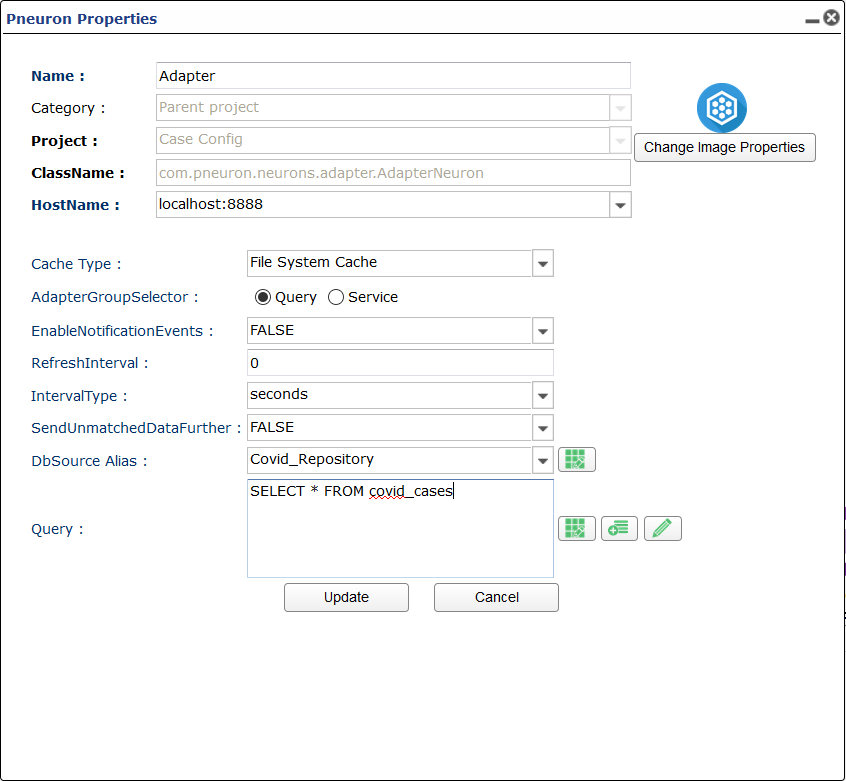
Cache Type
How the data is cached. Options are:
- File System Cache
- In Memory Cache
Adapter Group Selector
Choose how the data is gathered. Options are either Query or Service.
Enable Notification Events
Option for enabling notification events. TRUE or FALSE.
Refresh Interval
How long the refresh interval is.
Interval Type:
Units of time the refresh interval lasts.
If Query is Chosen as Selector
Send Unmatched Data Further
Send unmatched records to cache.
Db Source
Datasource alias that is queried and cached
Query
SQL Query
If Service is Chosen as Selector Type
HTTP Alias
HTTP URL alias used to make HTTP or Service requests
Web Service Interface
Library used as service interface.
Call Method
Method call used in request.
Parameter/Header Box Box used to configure parameters and headers needed in HTTP or service calls.
Analytic Pneuron
| Image | Category | Description |
|---|---|---|
 |
Analytics | Executes complex analytical, mathematical and statistical algorithms in the Pneuron network in real time using the data extracted from an incoming XML message. |
Pneuron Configuration
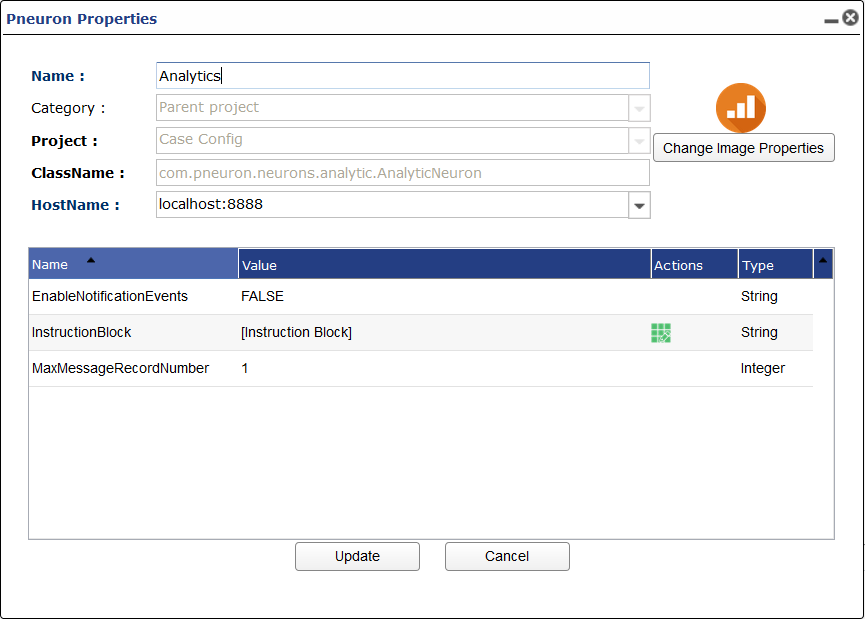
Enable Notification Events
Option for enabling notification events. TRUE or FALSE.
Instruction Box
When selecting the green actions icon you will be taken to the analytics editor where you can build logic and utilize several forulas on incoming tags. THe pneuorn will execute the instructions for each message received.
Max Message Record Number:
Number of records per message sent from this pneuron.
Case Pneuron
| Image | Category | Description |
|---|---|---|
 |
Analytics | Create multiple message routing paths based on defined conditions within the XML data in messages. |
Pneuron Configuration

Enable Notification Events
Option for enabling notification events. TRUE or FALSE.
Max Message Record Number:
Number of records per message sent from this pneuron.
Case Branch Box
In this box you create the the branches with associated condition. start by pressing the add new button and naming the branch. Add a conditional statement and entering the project and pneuron the branch connection goes to. Default is the branch that doesn't satisfy any previoud conditional statement. The execute only first condition match stops each conditional statement being used for each message.
Check Transaction Pneuron
| Image | Category | Description |
|---|---|---|
 |
Message | Checks to determine if messages marked as transactions by the Start Transaction Pneuron have been processed. |
Pneuron Configuration
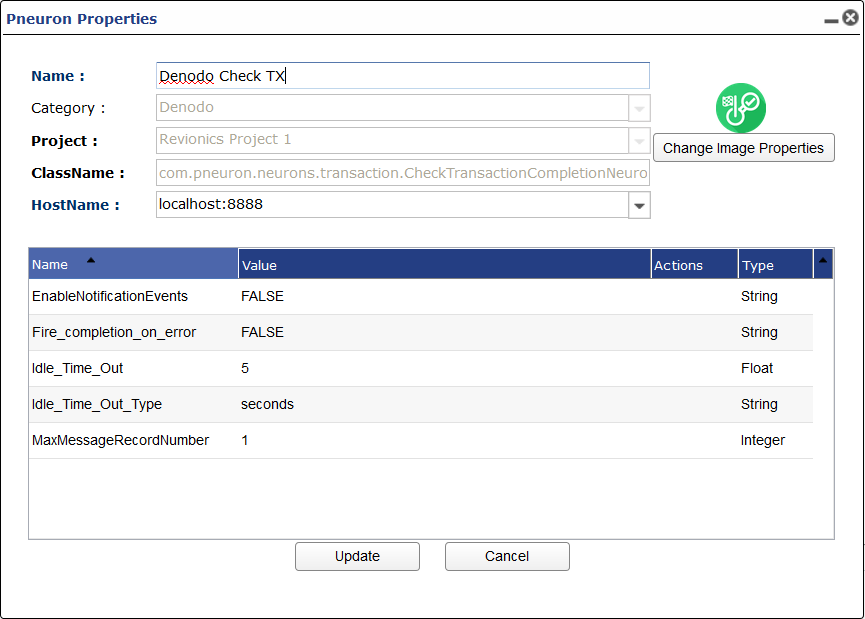
Enable Notification Events
Option for enabling notification events. TRUE or FALSE.
Fire Completion on Error
Will this pneuron fire if the branch after start transacion errors? TRUE or FALSE.
Idle Timeout
Time the check transaction pneuron takes to execute network following it. based on last received message on the last pneuron network after the start transaction pneuron.
Idle Timeout Type
Unit of time that applies to idle time.
MaxMessageRecordNumber
Number of records per message sent from this pneuron.
Compare Pneuron
| Image | Category | Description |
|---|---|---|
 |
Analytics | Used to create two alternate paths within a Pneuron network by configuring an if/else statement. |
Pneuron Configuration
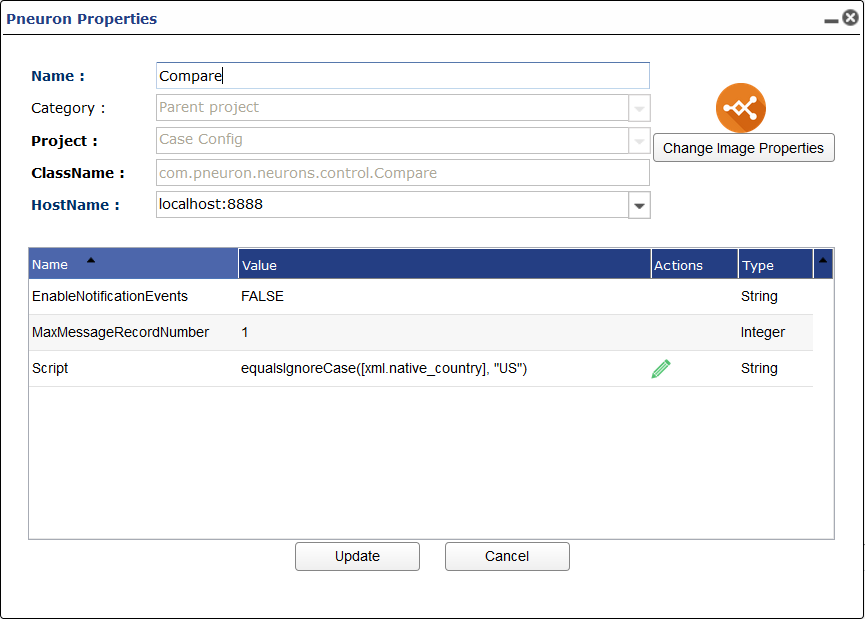
Enable Notification Events
Option for enabling notification events. TRUE or FALSE.
Max Message Record Number
Number of records per message sent from this pneuron.
Script
The conditional statement for the branch.
Custom Pneuron
| Image | Category | Description |
|---|---|---|
 |
All | Enables experienced developers to create new Pneuron types by placing custom logic within a standard Pneuron shell that maintains interoperability with all other Pneurons. |
Data Type Pneuron
| Image | Category | Description |
|---|---|---|
 |
Data Interaction | Casts incoming XML fields to a specified data type. |
Pneuron Configuration
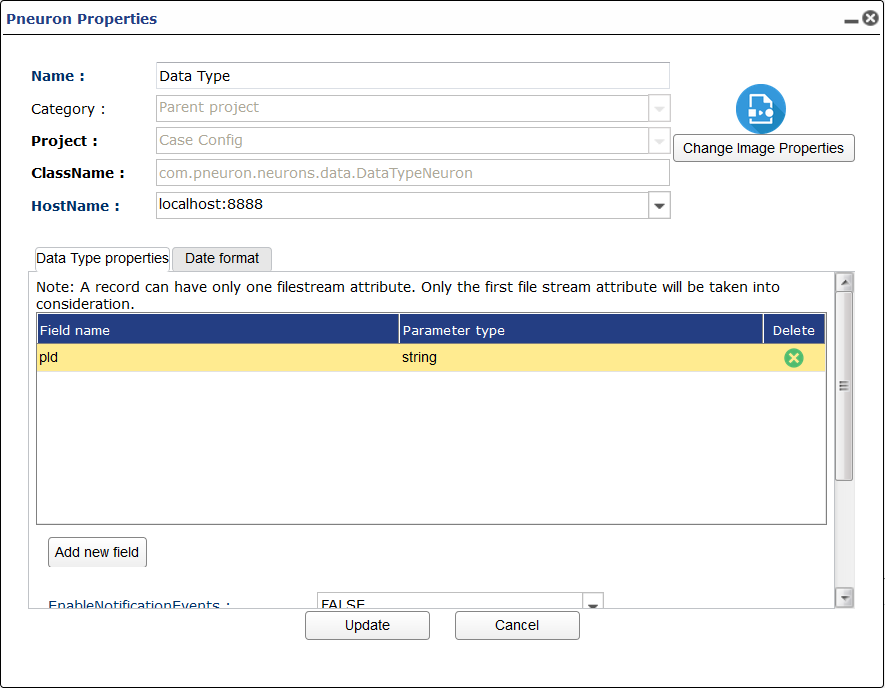
Data conversion Table
This is where you choose oncoming tags to cast to different data type.
Enable Notification Events
Option for enabling notification events. TRUE or FALSE.
MaxMessageRecordNumber
Number of records per message sent from this pneuron.
Keep Original Attribute if File Stream
If the data item you are converting is a file stream do you want to keep the original attribute after conversion? TRUE or FALSE.
Repository Alias
Directory alias used to store data item converted to file type.
Database Stream Pneuron
| Image | Category | Description |
|---|---|---|
 |
Data Interaction | Takes data, saves it to a file, and then stores the file reference in a database in a specified data type. |
Pneuron Configuration
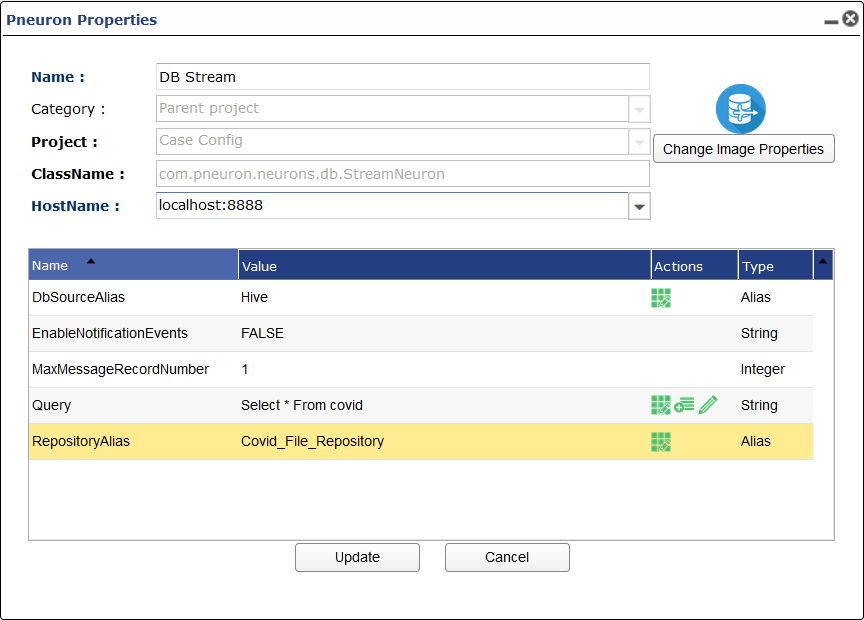
DB Source Alias
Choose DB source you want to get data from.
EnableNotificatinEvents
Option for enabling notification events. TRUE or FALSE.
MaxMessageRecordNumber
Number of records per message sent from this pneuron.
Query
SQL Query
Repository Alias
Directory alias where the data will be saved to file.
Document Pneuron
| Image | Category | Description |
|---|---|---|
 |
Data Interaction | Indexes documents and retrieves the file name containing a specific search string. |
EDI/HL7 Parser Pneuron
| Image | Category | Description |
|---|---|---|
 |
Data Interaction | Enables you to convert EDI or HL7 messages to XML. |
Pneuron Configuration
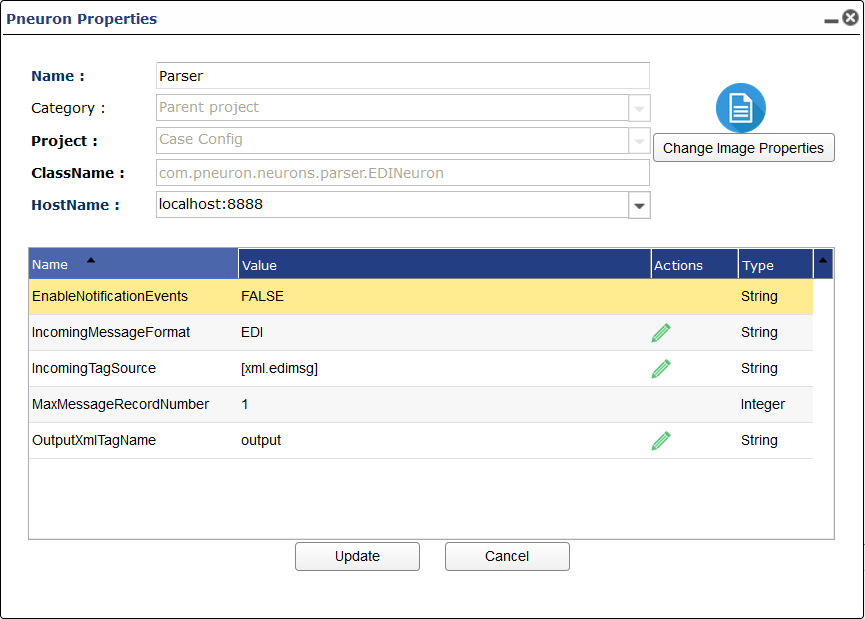
EnableNotificatinEvents
Option for enabling notification events. TRUE or FALSE.
Incoming Message Format
The type of message format that you want to parse.
Incoming Tag Source
What tag contains the message to be parsed.
Max Message Record Number
Number of records per message sent from this pneuron.
Output XML Tag Name
Tag name of the result of parsing incoming tag.
Event Hub Listener Pneuron
| Image | Category | Description |
|---|---|---|
 |
Messaging | Provides the ability receive messages from an Azure Event Hub. |
Pneuron Configuration
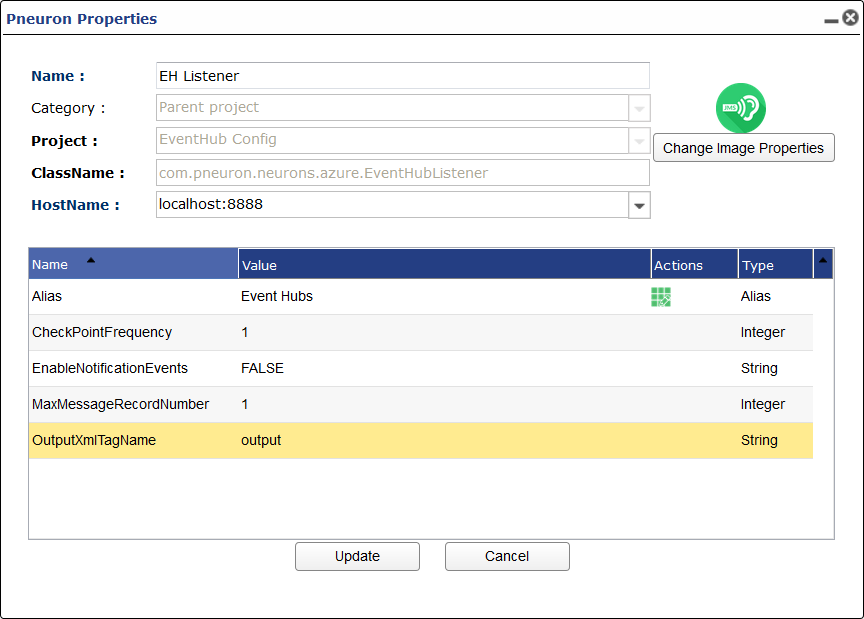
Alias
Event Hubs alias you want to listen to.
Checkpoint Frequency
Number of messages till you update the checkpoint.
Enable Notification Events
Option for enabling notification events. TRUE or FALSE.
Max Message Record Number
Number of records per message sent from this pneuron.
Output XML Tag Name
Tag name of the message being read from Event Hubs.
Event Hub Publisher Pneuron
| Image | Category | Description |
|---|---|---|
 |
Messaging | Provides the ability to place a message onto an Azure Event Hub . |
Pneuron Configuration
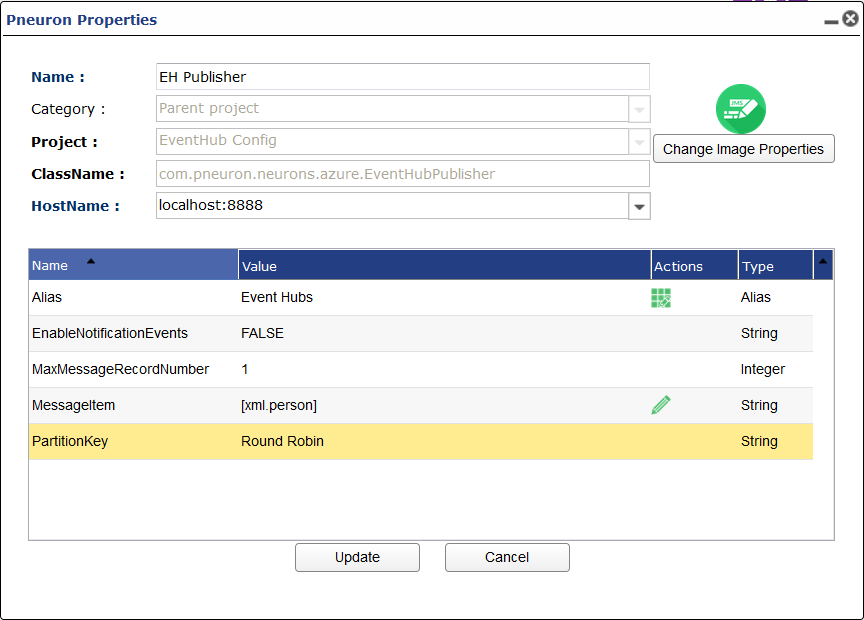
Alias
Event Hubs alias you want to listen to.
Enable Notification Events
Option for enabling notification events. TRUE or FALSE.
Max Message Record Number
Number of records per message sent from this pneuron.
Message Item
Tag item to be published to Event Hubs.
Partition Key
Partition key used to specify what partition the message is sent to. Round Robin is the default method of choosing the partition.
File Pneuron
| Image | Category | Description |
|---|---|---|
 |
Data Interaction | Used to parse a file (JSON, XML, CSV, Excel, Unstructured) and retrieve specific attributes for further processing. |
Pneuron Configuration
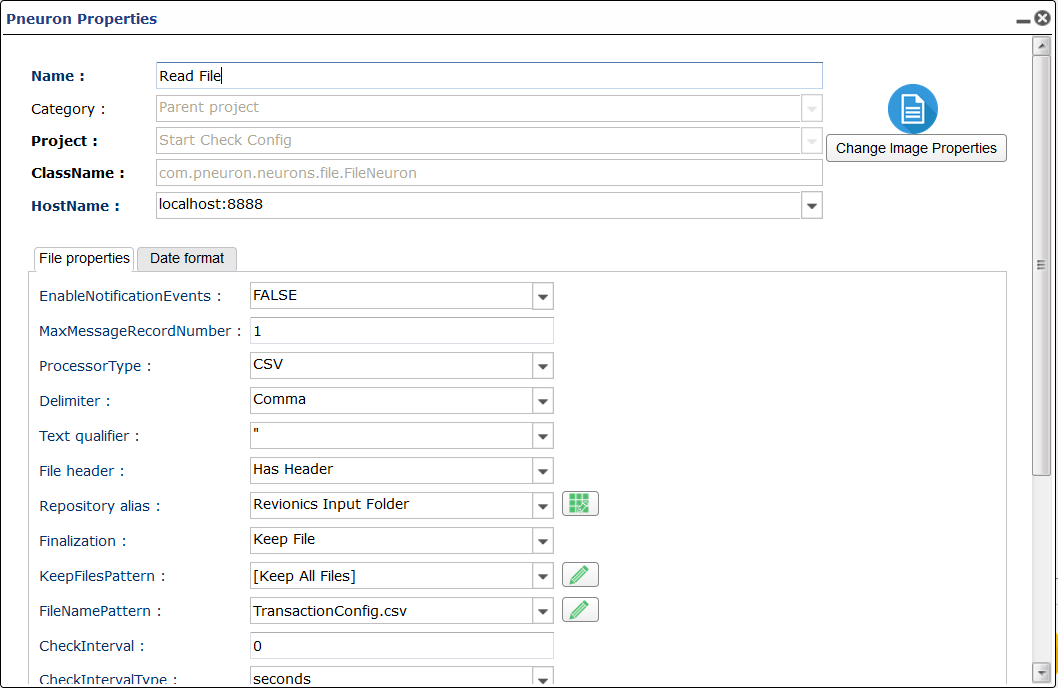
Enable Notification Event
Option for enabling notification events. TRUE or FALSE.
Max Message Record Number
Number of records per message sent from this pneuron.
Processor Type
What file type are you reading in? Options are:
CSVXMLUnstructured Data/XLSBulk ReadJSON
If CSV is Chosen New Options Appear:
-
Delimeter
How is the CSV delimited. Options are:
CommaTabSemicolonSpaceOther
-
Text Qualifier
How is text escaped from in the CSV? Options are:
'"
If JSON is Chosen New Options Appear:
-
JSON Path
Path that allows for extracting certain fields from JSON file. See example for more information.
Repository Alias
Directory alias where you are reading the file from.
Finalization
Upon completion of pneuorn functionality what do you want to happen to the file you read in. Options are:
Keep FileMove ToDelete.
If Move To is Chosen New Options Appear:
-
Destination Alias
Directory alias of where you want the file moved to upon completion.
If Keep File is Chosen New Options Appear:
-
Keep Files Pattern
Pattern of files you want to keep.
File Name Pattern
Name of file or pattern you want to be read in.
Check Interval
Integer interval between checking files.
Check Interval Type
Unit of time check interval goes by.
Process Files From
Where you process files from. Options are:
RepositoryFile Reference.
File Action Pneuron
| Image | Category | Description |
|---|---|---|
 |
Data Interaction | Used to manage directory, file data and structure. |
Pneuron Configuration

Action Type
What action on the files or folder do you want to perform. Options are:
Copy FilesMove FilesDelete FilesCreate FolderDelete FolderCount FilesRename File
If Copy Files or Move Files is Chosen More Options Appear:
-
Source Alias
Directory alias were you are copying or moving files from.
-
Destination Alias
Directory alias were you are copying or moving files to.
-
Conflict Resolution
How do you want to resolve conflicts. Options are:
Add GUIDOverwrite with ErrorSkip and Throw Error
-
Destination Location
File path location within Destination Alias you want the file copied to moved to.
-
Pattern
File pattern you want to perform action on.
If Copy Files or Move Files is Chosen More Options Appear:
-
Pattern
File pattern you want to perform action on.
If Rename File is Chosen More Options Appear:
-
Conflict Resolution
How do you want to resolve conflicts. Options are:
Add GUIDOverwrite with ErrorSkip and Throw Error
-
New File Name
New name of file you want to rename.
-
Current File Name
File you want to Rename.
Enable Notification Events:
Option for enabling notification events. TRUE or FALSE.
Max Message Record Number:
Number of records per message sent from this pneuron.
File Writer Pneuron
| Image | Category | Description |
|---|---|---|
 |
Data Interaction | Used to output specific attributes to a file for viewing or for use by external systems. |
Pneuron Configuration

Enable Notification Events
Option for enabling notification events. TRUE or FALSE.
Repository Alias
Directory Alias of where in the file system you want to write the file to.
File Type
What type of file you want to save content as. Options are:
CSVXMLExcelJSON
If Excel is Chosen a New Option Appear:
-
Sheet Name
Name of sheet created in excel file.
If CSV, XML, or JSON is Chosen New Options Appear:
-
File Name
Name of file being written to.
-
Max Size of Files in Mb
Max file size of file being written to. 0 is default and means it can be infinite size.
-
Destination Location
Path within Directory Alias that you want file to be written to.
Processor Type
How you want the file to be written. Options are:
On the Fly WriteBulk Write
Adapter Group Selector
What processor for bulk write do you want. Options are:
QueryService
If Query is Chosen New Options Appear:
-
Send Unmatched Data Further
Name of sheet created in excel file.
-
DB Source Alias
DB Source alias.
-
Query
SQL Query.
If Service is Chosen New Options Appear:
-
HTTP Alias
HTTP Alias used for web service.
-
Web Service Interface
What library interface to use.
-
Call Method
HTTP Method being used.
Max Message Record Number
Number of records per message sent from this pneuron.
Message Tag Table
This table is where you select which tags are written to file.
Filter Pneuron
| Image | Category | Description |
|---|---|---|
 |
Data Interaction | Allows the filtering of fields from XML messages and passes only the selected fields forward in the network. |
Pneuron Configiration
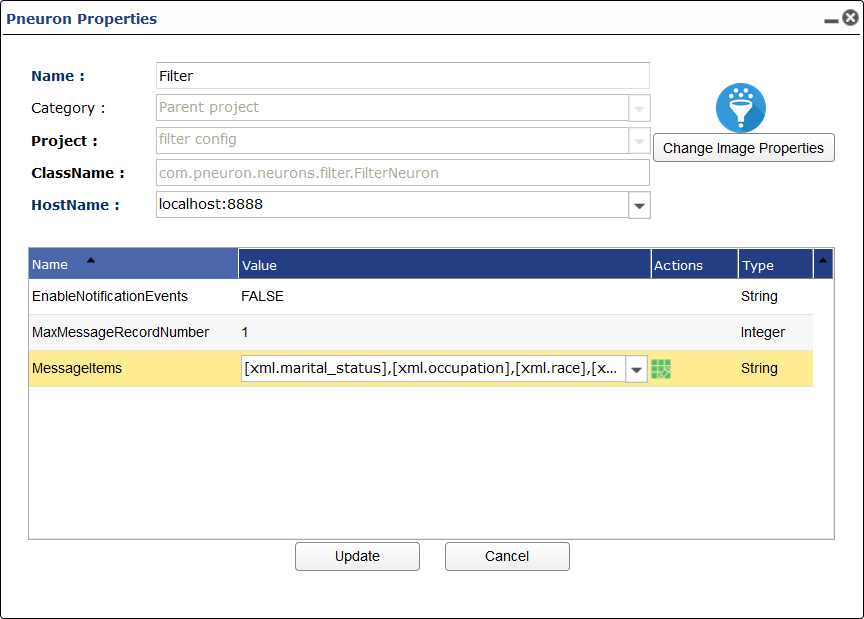
Enable Notification Events
Option for enabling notification events. TRUE or FALSE.
Max Message Record Number
Number of records per message sent from this Pneuron.
Message Items
Choose which tags you want to continue onto the following Pneuron network. The unselected items will be filtered/removed from the network.
FTP Pneuron
| Image | Category | Description |
|---|---|---|
 |
Data Interaction, Output | Allows interaction with an FTP server to retrieve or store information. |
Pneuron Configuration
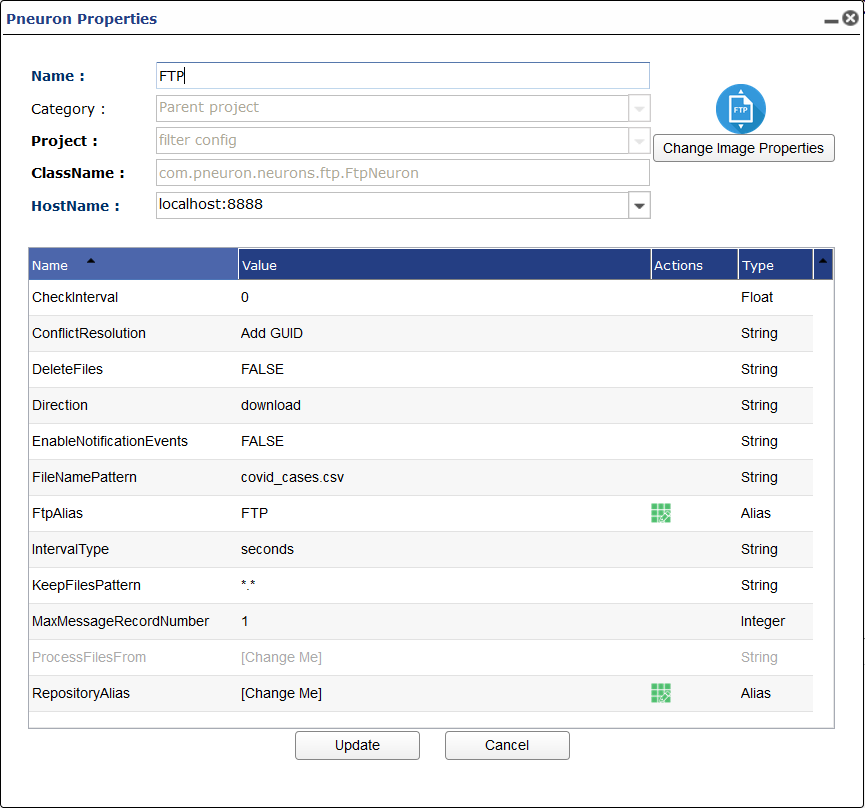
Check Interval
Time till check of FTP occurs.
Conflict Resolution
Conflict resol0tion. Options are:
Add GUIDOverwrite with ErrorSkip and Throw Error
Delete Files
Delete Files you perform FTP action on.
Direction
What action being performed in FTP. Options are:
DownloadUpload
Enable Notification Events
Option for enabling notification events. TRUE or FALSE.
File Name Pattern
Name of file/s.
FTP Alias
FTP Alias.
Interval Type
What unit of tie applies to Check Interval.
Keep Files Pattern
What files should be kept after FTP action.
Max Message Record Number
Number of records per message sent from this Pneuron.
Process Files From
Where are files processed from. Options are:
File ReferenceRepository
Repository Alias
Directory Alias used to download/upload files from.
Hadoop Action Pneuron
| Image | Category | Description |
|---|---|---|
 |
Data Interaction | Perform a variety of actions on files in the Hadoop Distributed File System (HDFS). |
Pneuron Configuration
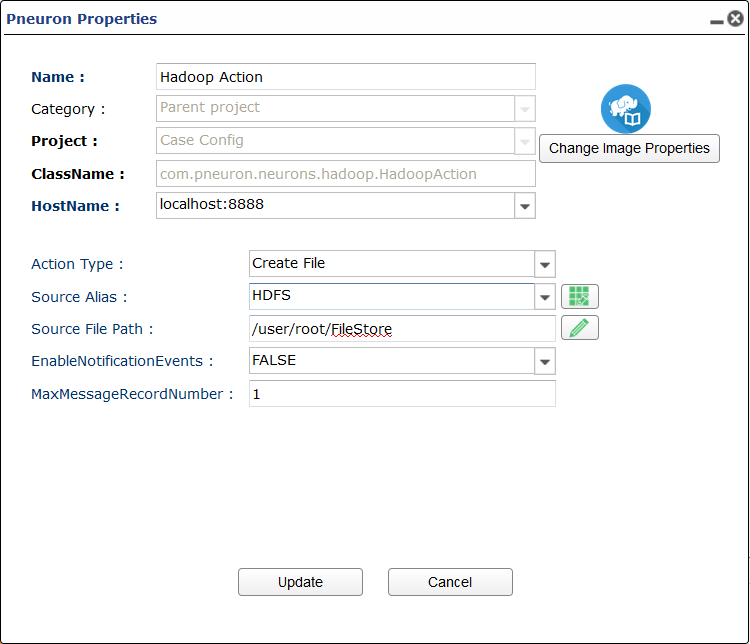
Action Type
The Action you want to perform in a file/folder in HDFS. Options are:
Create FileDelete FileRename/Move FileGet Used SpaceGet File Names in LocationCheck if File Exists
If Rename/Move File is Chosen New Options Appear
-
Destination File Path
File path destination of where you want to move the file in HDFS.
Source Alias
Hadoop Alias used for conecting to HDFS.
Source File Path
File path of file you want to perform action on.
Enable Notification Events
Option for enabling notification events. TRUE or FALSE.
Max Message Record Number
Number of records per message sent from this Pneuron.
Hadoop Reader Pneuron
| Image | Category | Description |
|---|---|---|
 |
Data Interaction | Read files from a Hadoop Distributed File System (HDFS). |
Pneuron Configuration
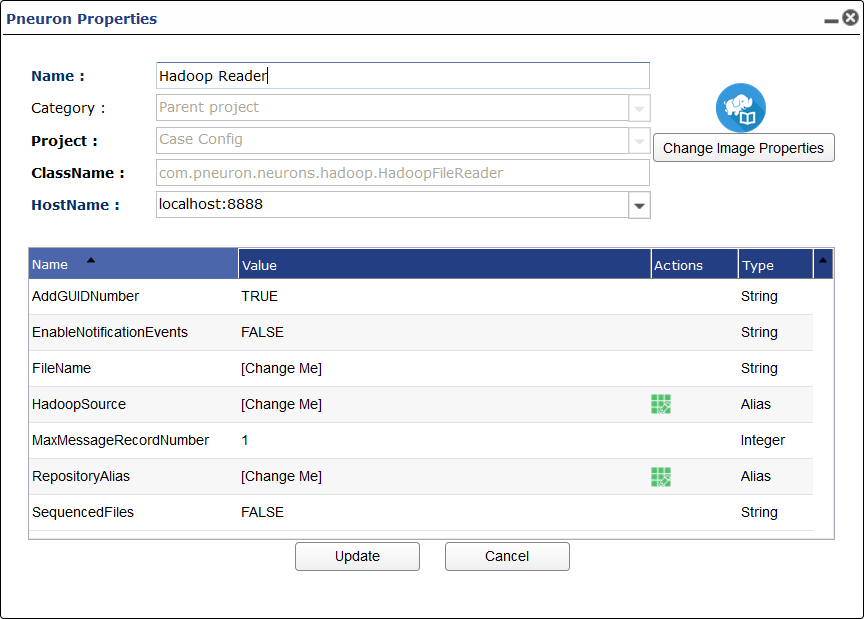
Add GUID Number
Should this pneuron add a GUID number to the file your reading.
Enable Notification Events
Option for enabling notification events. TRUE or FALSE.
File Name
Name of file you want to read.
Hadoop Source
Hadoop Alias used to connect to HDFS.
Max Message Record Number
Number of records per message sent from this Pneuron.
Repository Alias
Directory Alias that is the destination folder in the local file system.
Sequenced Files
Are the files sequenced. Options are True or False.
Hadoop Writer Pneuron
| Image | Category | Description |
|---|---|---|
 |
Data Interaction | Write files to a Hadoop Distributed File System (HDFS). |
Pneuron Configuration

Delete Files
Delete the files you're writing from.
Enable Notification Events
Option for enabling notification events. TRUE or FALSE.
Export Sequenced Message
Export sequenced message with records and file reference.
File Name Pattern
Name of the file you're writing to.
Max Message Record Number
Number of records per message sent from this Pneuron.
Repository Alias
Directory Alias containing files your reading from.
Use File Reference
Use file reference instead of witing from Directory Alias.
HTTP Pneuron
| Image | Category | Description |
|---|---|---|
 |
Data Interaction | Retrieves an HTTP response as a file. |
Pneuron Configuration
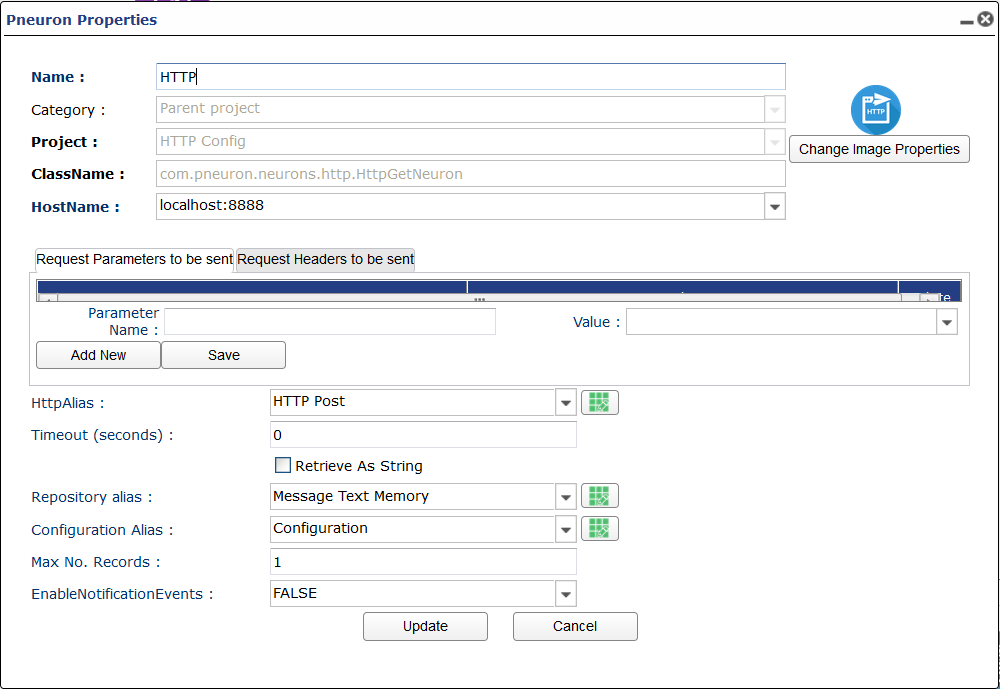
Parameters and Headers Box
Enter any needed headers or parameters into this box. If the body requires a body type in body into a parameter field.
HTTP Alias
HTTP Alias that allows for requests to a URL.
Timeout
Timeout for response.
Repository Alias
Directory Alias for saving the response as a file.
Configuration Alias
Configuration Alias used to describe the HTTP Request. (Optional)
Enable Notification Events
Option for enabling notification events. TRUE or FALSE.
Max Message Record Number
Number of records per message sent from this Pneuron.
HTTP Proxy Pneuron
| Image | Category | Description |
|---|---|---|
 |
Data Interaction | Works as an HTTP Proxy which enables the capture of individual HTTP requests. Each request is sent in a message with the request details. |
Pneuron Configuration
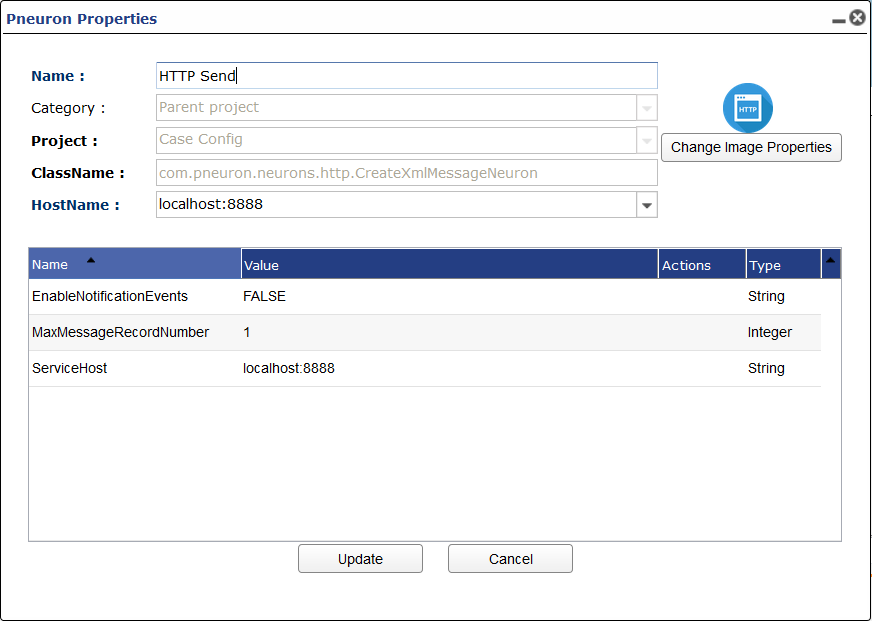
Enable Notification Events
Option for enabling notification events. TRUE or FALSE.
Max Message Record Number
Number of records per message sent from this Pneuron.
Service Host
URL of service host that this Pneuron is a proxy too.
HUD Pneuron
| Image | Category | Description |
|---|---|---|
 |
Output | Heads Up Display. Allows the display an external pop-up message that provides immediate feedback on a function within a network. |
Pneuron Configuration

Enable Notification Events
Option for enabling notification events. TRUE or FALSE.
Max Message Record Number
Number of records per message sent from this Pneuron.
JMS Listener Pneuron
| Image | Category | Description |
|---|---|---|
 |
Messaging | Provides the ability to listen to a JMS queue. |
Pneuron Configuration

Enable Notification Events:
Option for enabling notification events. TRUE or FALSE.
JMS Alias
JMS Alias used to connect to a JMS queue.
JMS Client ID
Client ID used in JMS.
Max Message Record Number
Number of records per message sent from this Pneuron.
Persist Message
All messages that are read off the JMS can be persisted. Options are True or False.
JMS Publisher Pneuron
| Image | Category | Description |
|---|---|---|
 |
Messaging | Provides the ability to place an XML message onto a JMS queue. |
Pneuron Configuration
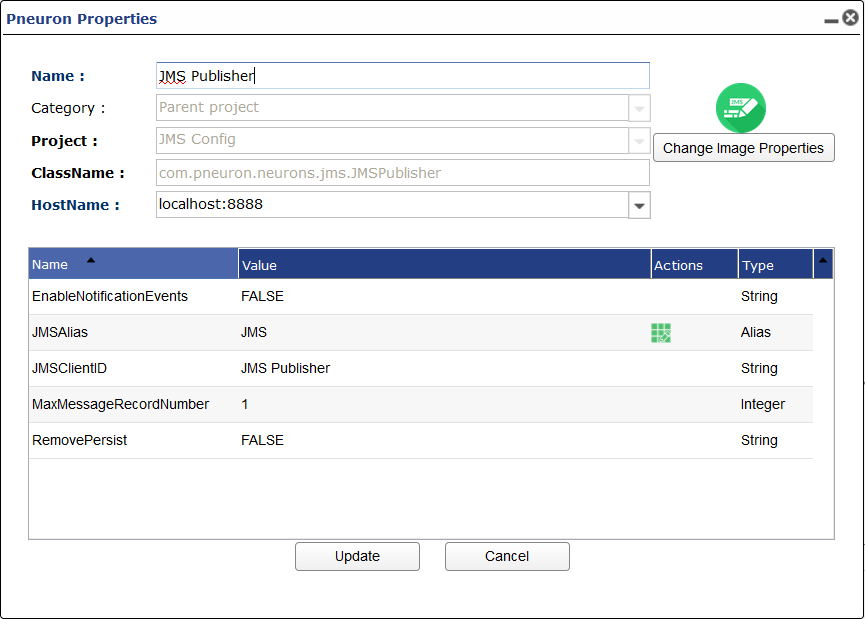
Enable Notification Events
Option for enabling notification events. TRUE or FALSE.
JMS Alias
JMS Alias used to connect to a JMS queue.
JMS Client ID
Client ID used in JMS.
Max Message Record Number
Number of records per message sent from this Pneuron.
Remove Persist
All messages that are pubished the JMS can be persisted. This would remove them from being persisted. Options are True or False.
Kafka Listener Pneuron
| Image | Category | Description |
|---|---|---|
 |
Messaging | Enables you to read from a Kafka topic. |
Pneuron Configuration
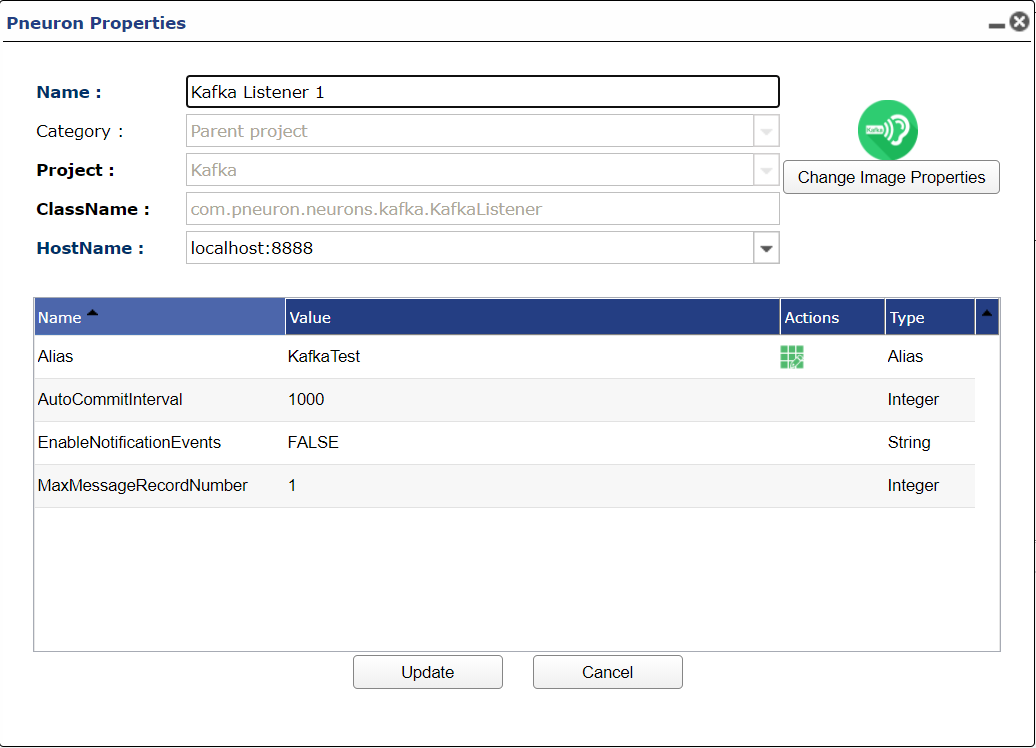
Alias
This is the Kafka alias containing information like host, port, and topic you wish to listen to.
Auto Commit Interval
This is the auto commit interval in ms for offset managing.
Kafka Publisher Pneuron
| Image | Category | Description |
|---|---|---|
 |
Messaging | Enables you to write to a Kafka topic. |
Pneuron Configuration
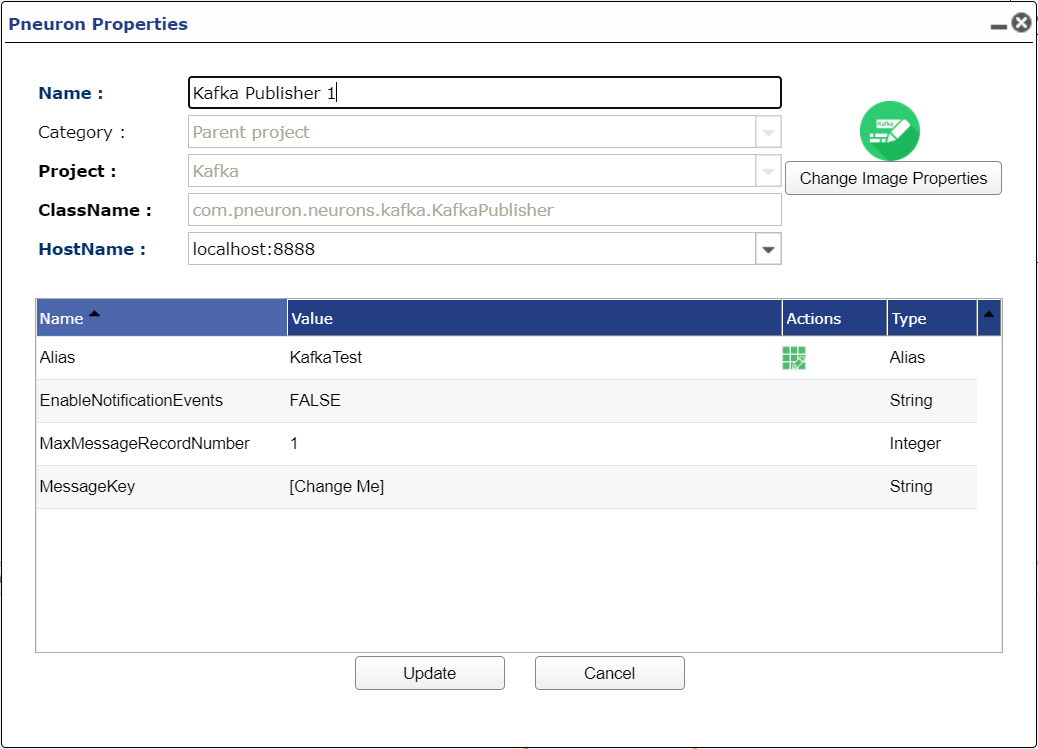
Alias
This is the Kafka alias containing information like host, port, and topic you wish to write to.
Message Key
Optional. The key of the message you want to send. The key would be used to determine to which partition the message would be sent. If not set, a message with a null key would be sent.
Mail Pneuron
| Image | Category | Description |
|---|---|---|
 |
Output | Sends e-mail. Requires the user to provide an SMTP server and login information. |
Pneuron Configuration
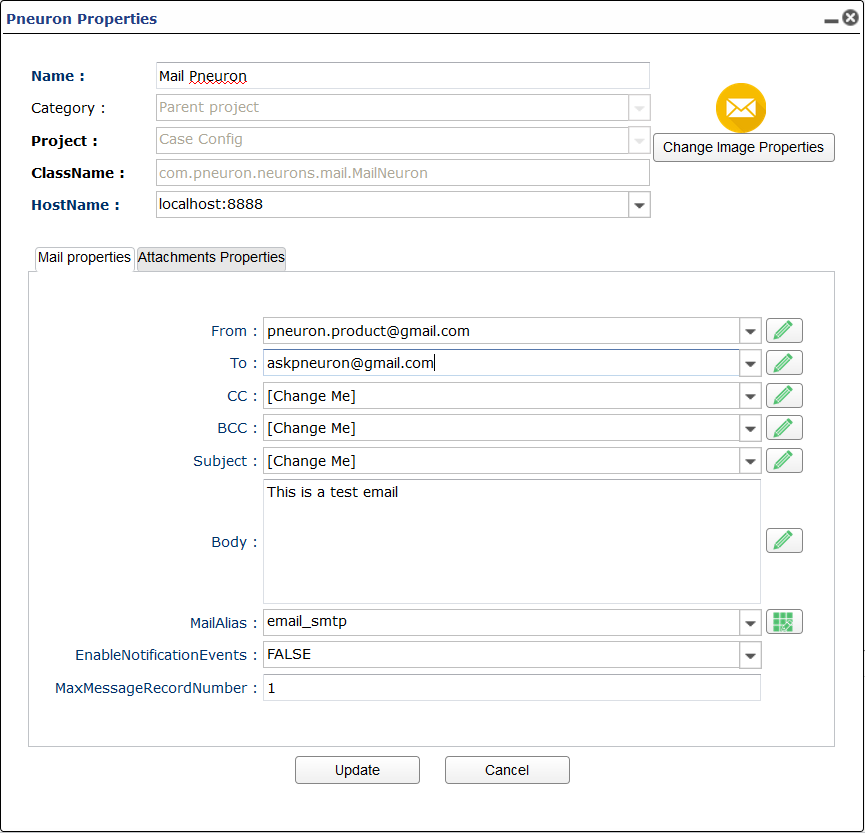
From
Email address of sender.
To
Email address/es of receiver.
CC
Email address/es who will receive a carbon copy of the email.
BCC
Email address/es who will receive a bind carbon copy of the email.
Subject
Subject of the email.
Body
Body of the email.
Mail Alias
Mail alias used to send emails.
Enable Notification Events
Option for enabling notification events. TRUE or FALSE.
Max Message Record Number
Number of records per message sent from this Pneuron.
Mail Reader Pneuron
| Image | Category | Description |
|---|---|---|
 |
Output | Used to connect to the mail server, establish recipients and senders, and get mail content. |
Pneuron Configuration
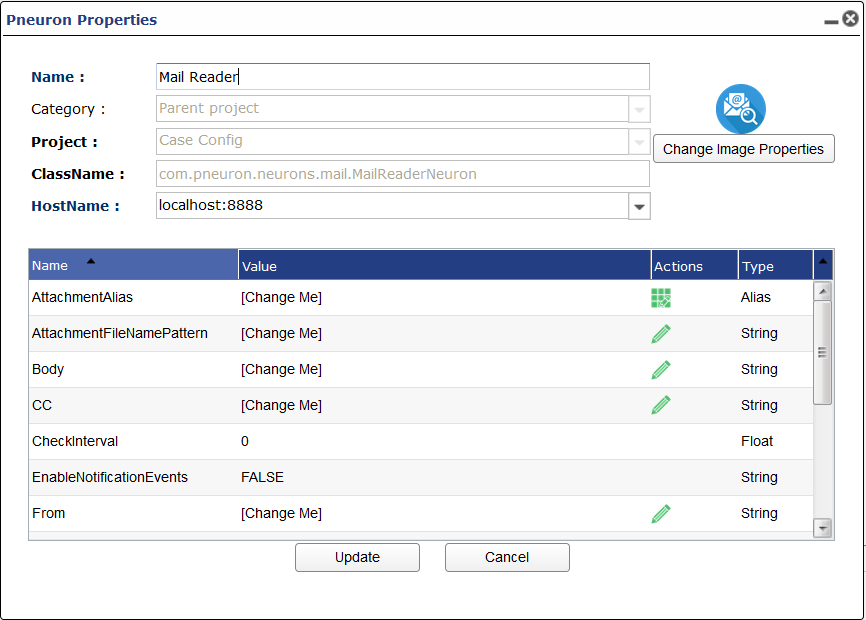
Attachment Alias
Directory Alias where attachements will be saved to.
Attachment File Name Pattern
File name of saved attachment.
Body
Email body message.
CC
Email carbon copy.
Check Interval
Time interval between checks
Enable Notification Events
Option for enabling notification events. TRUE or FALSE.
From
Email address of sender.
Has Attachment
Does the email you want read have an attachment
Interval Type
Time unit of interval
Mail Alias
Mail Alias used to connect to email server.
Max Message Record Number
Number of records per message sent from this Pneuron.
Not Older Than Days
Date for max age of email to be read.
Read From Folder Path
Option to read emails from a file path.
Subject
Subject line of email.
To
Email address of receiver.
Matching Pneuron
| Image | Category | Description |
|---|---|---|
 |
Analytics | Provides complex matching algorithms that can be used to identify and consolidate duplicate records or match records from different databases. |
Pneuron Configuration
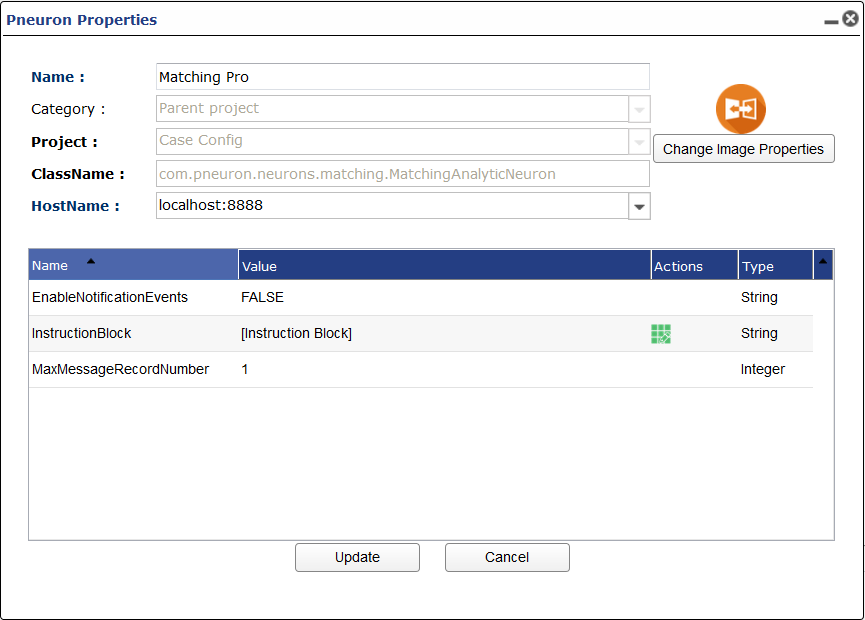
Enable Notification Events
Option for enabling notification events. TRUE or FALSE.
Instruction Block
Instruction set built in the analytic editor. Gives access to large matching library.
Max Message Record Number
Number of records per message sent from this Pneuron.
New Message Pneuron
| Image | Category | Description |
|---|---|---|
 |
Data Interaction | Generates a new XML message when defined criteria are satisfied by the content of an incoming XML message. |
Pneuron Configuration
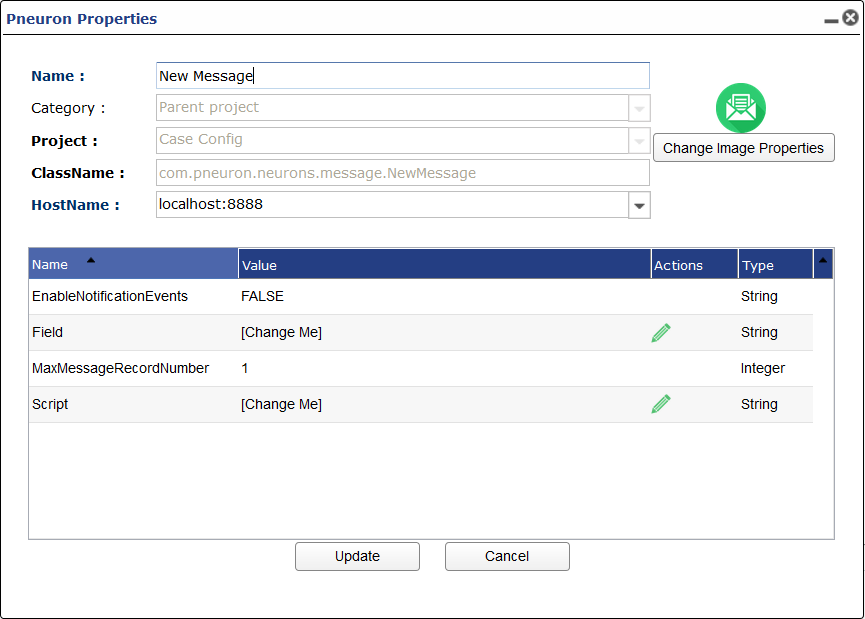
Enable Notification Events
Option for enabling notification events. TRUE or FALSE.
Field
Tag that you are monitoring to trigger a new message to be created.
Max Message Record Number
Number of records per message sent from this Pneuron.
Script
Script to be run when a new message is created.
NOSQL Pneuron
| Image | Category | Description |
|---|---|---|
 |
Data Interaction | Enables you to run queries on a NoSQL database. |
Pneuron Configuration

Data Source
This is the NoSQL Alias used by the NoSQL Pneuron. This pneuron supports MongoDB, CouchDB, and Cassandra.
Output Data
This is the name of the tage for the JSON output
Query
Where you put query. Input dependant on DB type.
MongoDB Query Example
Cassandra Query Example
CouchDB Query Example
POST;
_find;
{"selector":{"_id":{"$gt": null}}}
Note: You must supply the HTTP method and the route name first separated by ;. The third part the json query is optional depending on the query you want to run.
Enable Notification Events
Option for enabling notification events. TRUE or FALSE.
Max Message Record Number
Number of records per message sent from this Pneuron.
Persist Pneuron
| Image | Category | Description |
|---|---|---|
 |
Data Interaction | Used to save a message to a database table for future processing. |
Pneuron Configuration
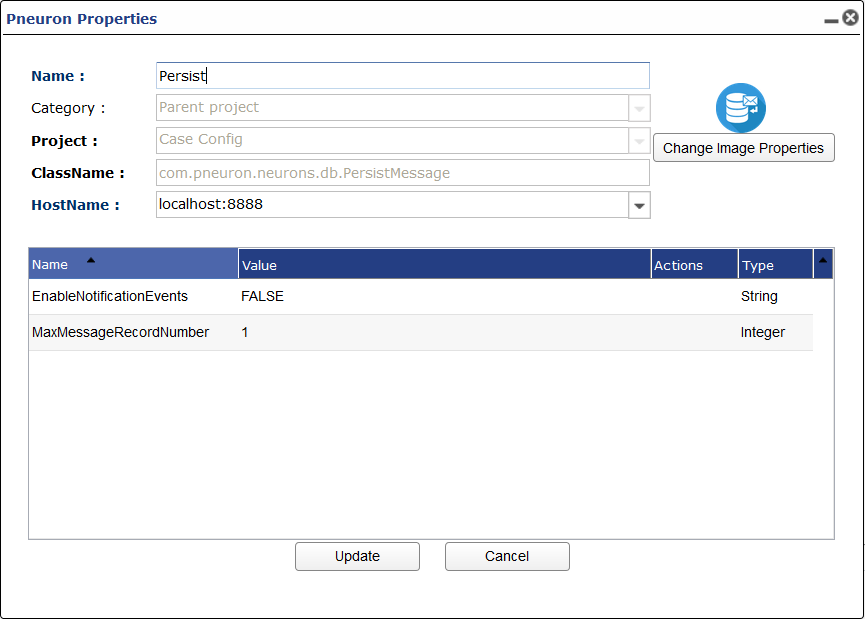
Enable Notification Events
Option for enabling notification events. TRUE or FALSE.
Max Message Record Number
Number of records per message sent from this Pneuron.
Pneuron Project
| Image | Category | Description |
|---|---|---|
 |
All | Enables you to create a new project for Pneuron Networks. |
Predictive Pneuron
| Image | Category | Description |
|---|---|---|
 |
Analytics | Enables users to import and execute a PMML compliant predictive model within a network. |
Pneuron Configuration
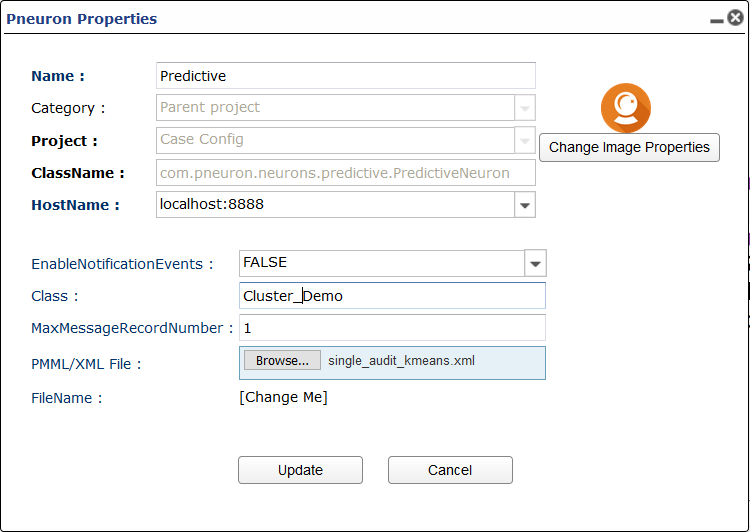
Enable Notification Events
Option for enabling notification events. TRUE or FALSE.
Class
Class named inside of PMML file.
Max Message Record Number
Number of records per message sent from this Pneuron.
PMML/XML File
PMML or XML File that contains predictive model.
Print Pneuron
| Image | Category | Description |
|---|---|---|
 |
Ouput | Provides ability to display XML message content within the Pneuron server console. |
| ___ |
Qubz Pneuron
| Image | Category | Description |
|---|---|---|
 |
Data Interaction | Provides ability to interact with Qubz's OLAP cubes and jobs. |
Pneuron Configuration
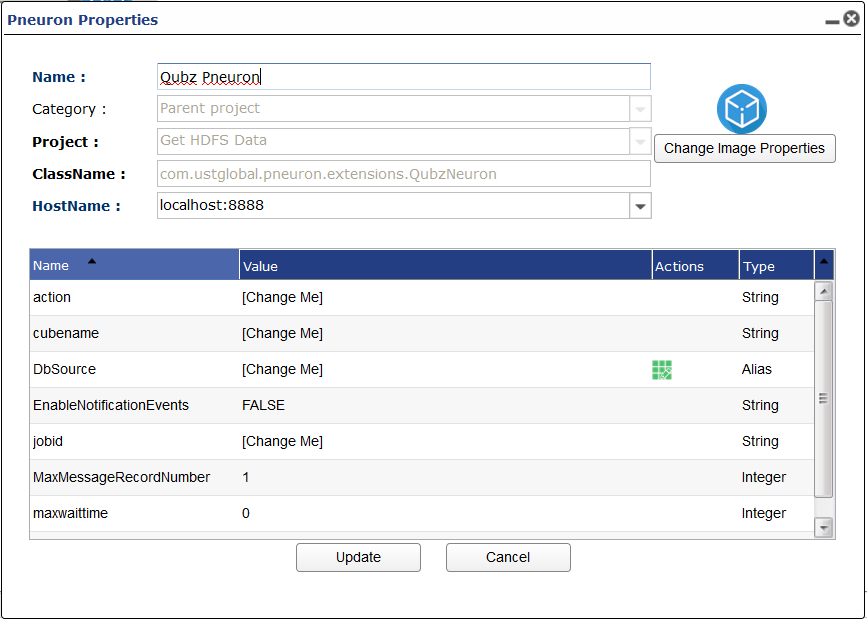
Action
There are currently 5 supported actions.
BUILDThis action builds the OLAP cube of the given cubename. Will wait for build job to finish based on maxwaittime.DELETEThis action deletes the OLAP cube of the given cubename.PAUSEThis action stops the job of the given jobidCANCELThis action discards the job of the given jobidRESUMEThis action resumes the job of the given jobid. Will wait for job to finished based on maxwaittime.
CubeName
This is the name of the cube you want to build. Must be exact match.
DbSource
DbSource alias for Qubz.
JobId
This is the Job Id of a job you want to perform an action on. Current Actions that require this field are PAUSE, CANCEL, RESUME. You can feed in tags into this config. Ex: [xml.qubz_job_id]
MaxWaitTime
This is the number of minutes you want to wait for a BUILD or RESUME action to complete. If this is set to 0 the pneuron will wait forever till the job is finished or errors. If the maxwaittime is less than the amount of time required to finish the job it will pass a tag named [xml.qubz_job_id] that contains the id of the job being acted on for further interaction.
Scheme
Either HTTP or HTTPS. If HTTPS is selected SSL is enabled when making the request to Qubz.
Enable Notification Events
Option for enabling notification events. TRUE or FALSE.
Max Message Record Number
Number of records per message sent from this Pneuron.
Query Pneuron
| Image | Category | Description |
|---|---|---|
 |
Data Interaction | Provides ability to create and execute a SQL database query against a defined data source. |
Pneuron Configuration
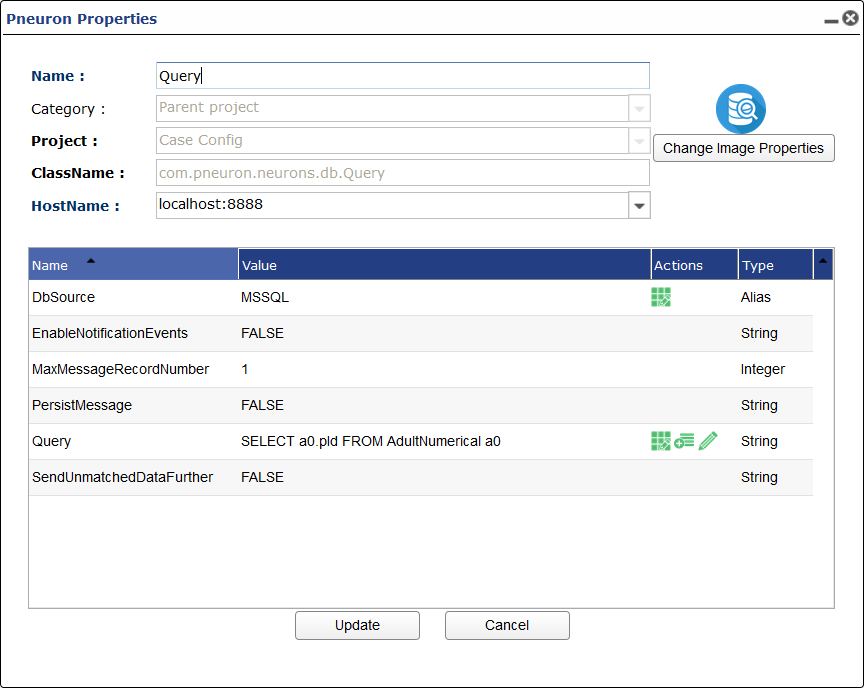
DB Source
DB Source alias used to make SQL queries.
Enable Notification Events
Option for enabling notification events. TRUE or FALSE.
Max Message Record Number
Number of records per message sent from this Pneuron.
Persist Message
Persist incoming message.
Query
SQL Query.
Send Unmatched Data Further
Send unmatched data further.
Record Pneuron
| Image | Category | Description |
|---|---|---|
 |
Data Interaction, Output | Records and stores events for auditing. |
Pneuron Configuration
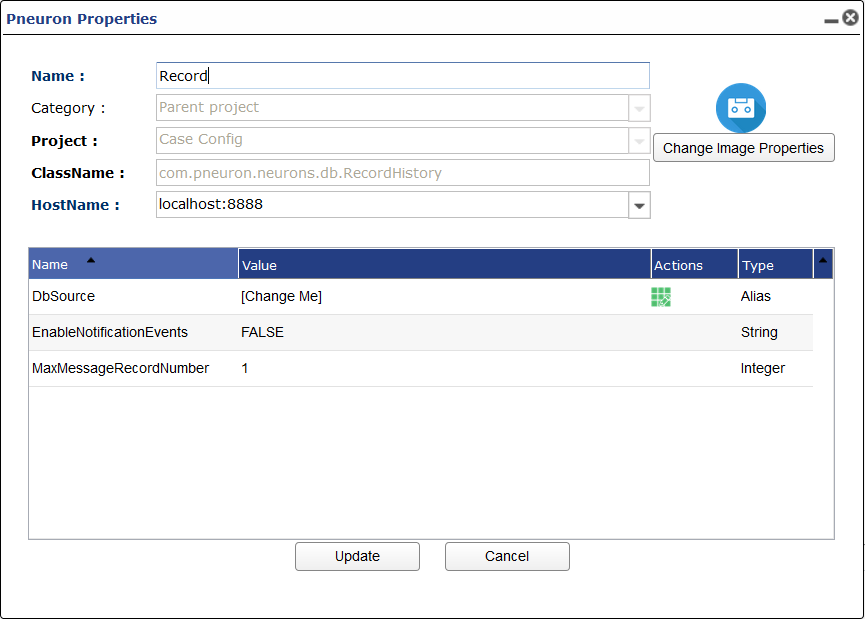
DB Source
DB Source alias you will record events to.
Enable Notification Events
Option for enabling notification events. TRUE or FALSE.
Max Message Record Number
Number of records per message sent from this Pneuron.
SAS Pneuron
| Image | Category | Description |
|---|---|---|
 |
Analytics | Provides ability to import and execute a SAS model within a network. |
Save Pneuron
| Image | Category | Description |
|---|---|---|
 |
Data Interaction | Saves a message to disk. |
Pneuron Configuration
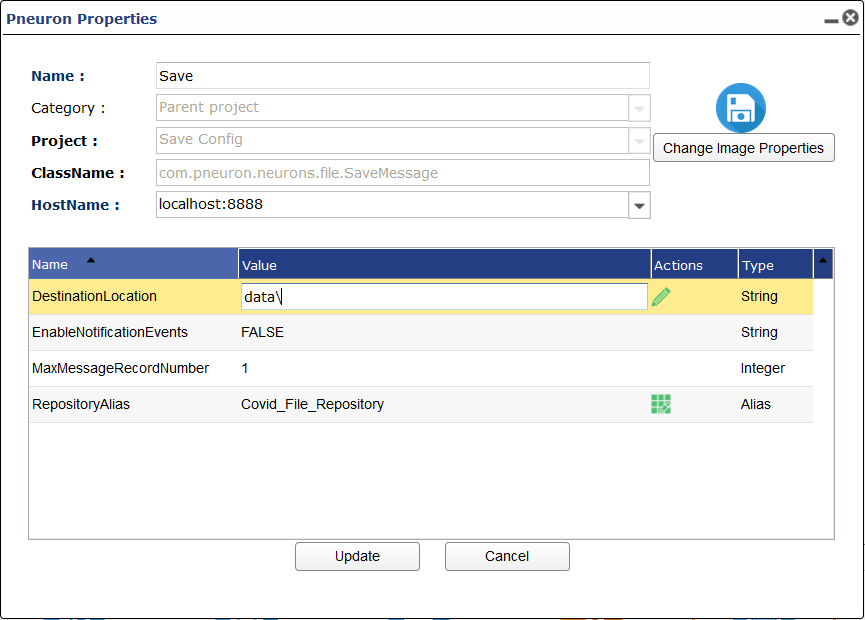
Destination Location
Location inside the repository alias where the message to be saved.
Enable Notification Events
Option for enabling notification events. TRUE or FALSE.
Max Message Record Number
Number of records per message sent from this Pneuron.
Repository Alias
Repository alias specifying a file path on the local system.
Schedule Pneuron
| Image | Category | Description |
|---|---|---|
 |
Data Interaction | Provides ability to configure time intervals and recurring events for executing Pneurons or a Pneuron network. |
Pneuron Configuration
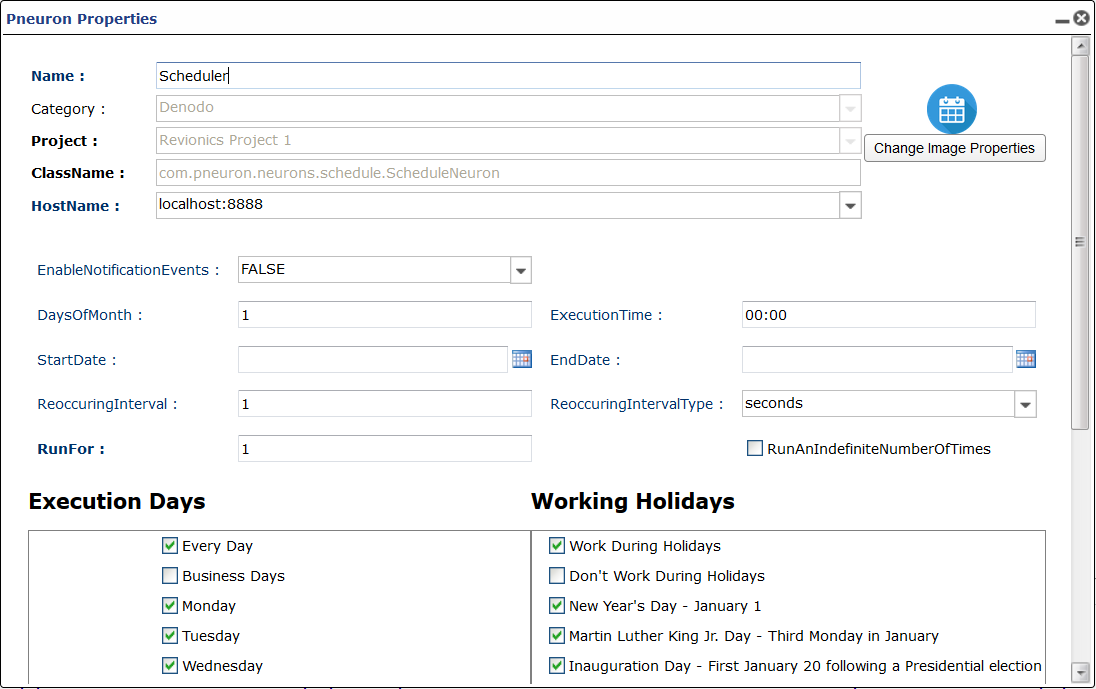
Enable Notification Events
Option for enabling notification events. TRUE or FALSE.
Days of Month
Specify which days of the month you want scheduled separated by semicolons. 1;15;24;30
Execution Time
Time of day you want to be scheduled. enter in hour and minute with colon. For multiple times separate using semicolon. EX 00:00;10:00;15:00
Start Date
Date to start scheduled fires of network.
End Date
Last day of scheduled fires of network.
Recurring Interval
Scheduler for a set interval between fires. 0 means not set.
Recurring Interval Type
Unit if time for recurring interval.
Run For
Fixed number of fire events that will occur.
Execution Days
Select days that the scheduler will fire.
Working Holidays
Select holidays that the scheduler will fire.
Sequence Pneuron
| Image | Category | Description |
|---|---|---|
 |
Messaging | Enables the network designer to set and increment a sequence number in an XML message. |
Pneuron Configuration
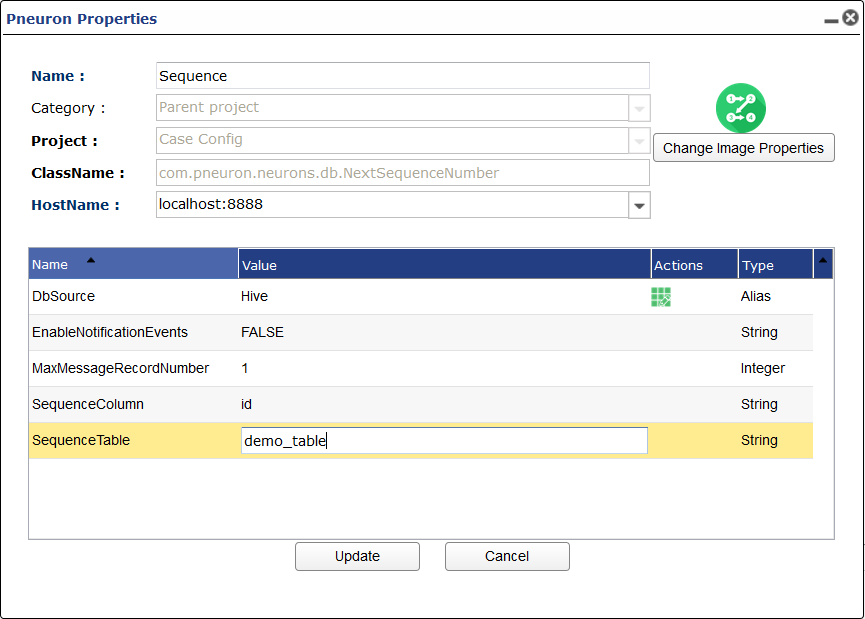
DB Source
DB Source Alias
Enable Notification Events
Option for enabling notification events. TRUE or FALSE.
Max Message Record Number
Number of records per message sent from this Pneuron.
Sequence Column
name of column containing sequence.
Sequence Table
Name of table containing sequence.
Service Pneuron
| Image | Category | Description |
|---|---|---|
 |
Data Interaction, Output | Connects to a web service defined by a WSDL specification. |
Pneuron Configuration
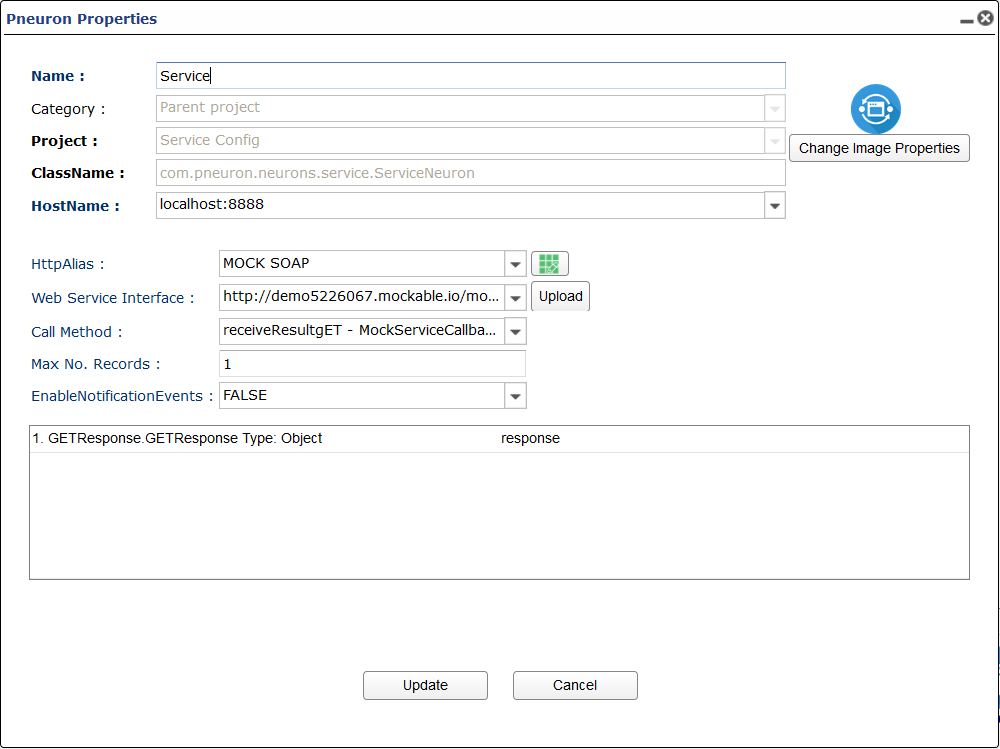
HTTP Alias
HTTP alias containing SOAP Service details
Web Service Interface
Library of interfaces.
Call Method
Service call method.
Enable Notification Events
Option for enabling notification events. TRUE or FALSE.
Max Message Record Number
Number of records per message sent from this Pneuron.
SharePoint Pneuron
| Image | Category | Description |
|---|---|---|
 |
Data Interaction | Connects to SharePoint to send or retrieve data. |
Shell Pneuron
| Image | Category | Description |
|---|---|---|
 |
Data Interaction | Executes shell scripts. |
Pneuron Configuration
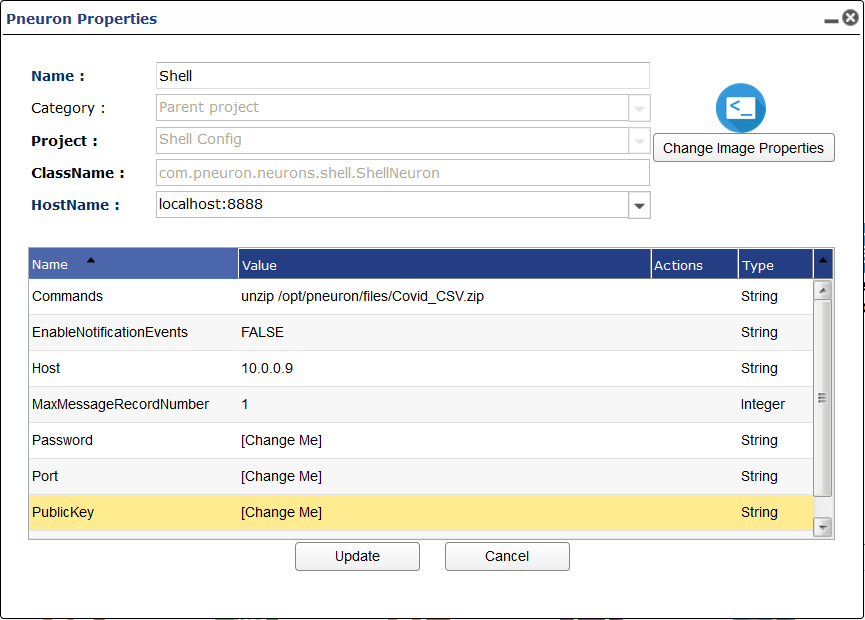
Commands
CLI command you want executed
Enable Notification Events
Option for enabling notification events. TRUE or FALSE.
Host
Host string of machine that the commands will be executed on.
Max Message Record Number
Number of records per message sent from this Pneuron.
Password
Password of user that the command will execute as
Port
Port number
Public Key
Public key used to run command on given host.
User
User that the command will execute as.
Sniffer Pneuron
| Image | Category | Description |
|---|---|---|
 |
Data Interaction | Monitors a URL and take an action if the URL is detected. |
Pneuron Configuration
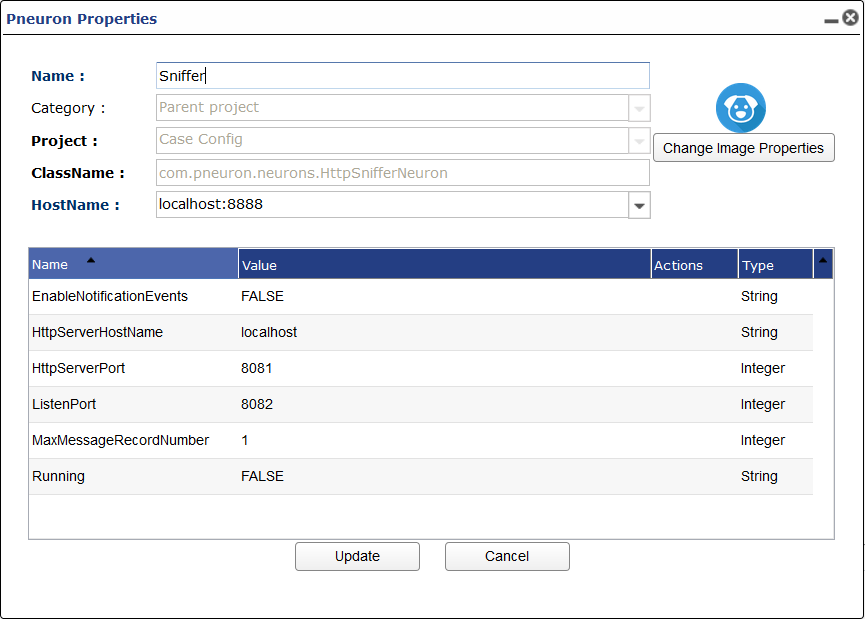
Enable Notification Events
Option for enabling notification events. TRUE or FALSE.
HTTP Server Host Name
Host of HTTP server.
HTTP Server Port
HTTP Server port number.
Listen Port
Port the sniffer should listen on.
Max Message Record Number
Number of records per message sent from this Pneuron.
Running
Is the sniffer running.
Solr Pneuron
| Image | Category | Description |
|---|---|---|
 |
Data Interaction | Used to search through a Solr Server. |
Pneuron Configuration
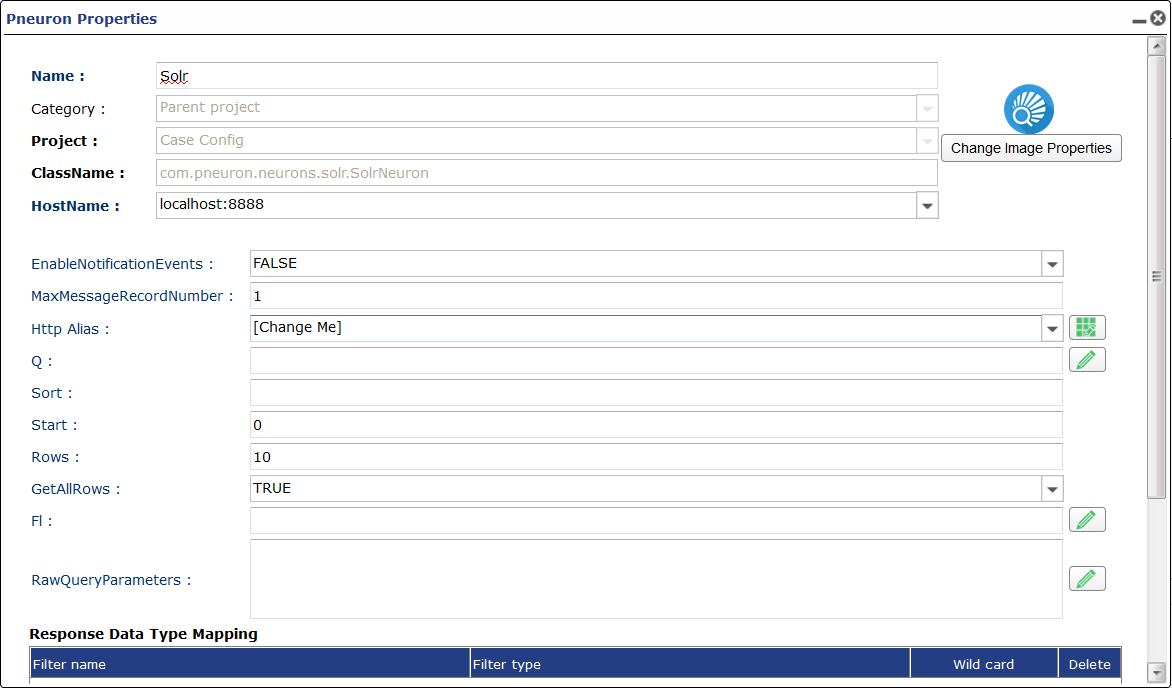
Enable Notification Events
Option for enabling notification events. TRUE or FALSE.
Max Message Record Number
Number of records per message sent from this Pneuron.
HTTP Alias
HTTP alias containing HTTP URL
Q
Query string.
Sort
Sort field or function containing asc or desc.
Start
number of leading documents to skip.
Rows
Number of documents to return after start.
Get all Rows
Return all rows.
Fl
Raw Query Parameters
Additional query parameters that are supported by Solr.
Response Data Type Mapping
Configure what data type the returned data is.
Spark Pneuron
| Image | Category | Description |
|---|---|---|
 |
Data Interaction | Used to submit Jar or Pyspark Applications to a Spark Cluster. |
Pneuron Configuration
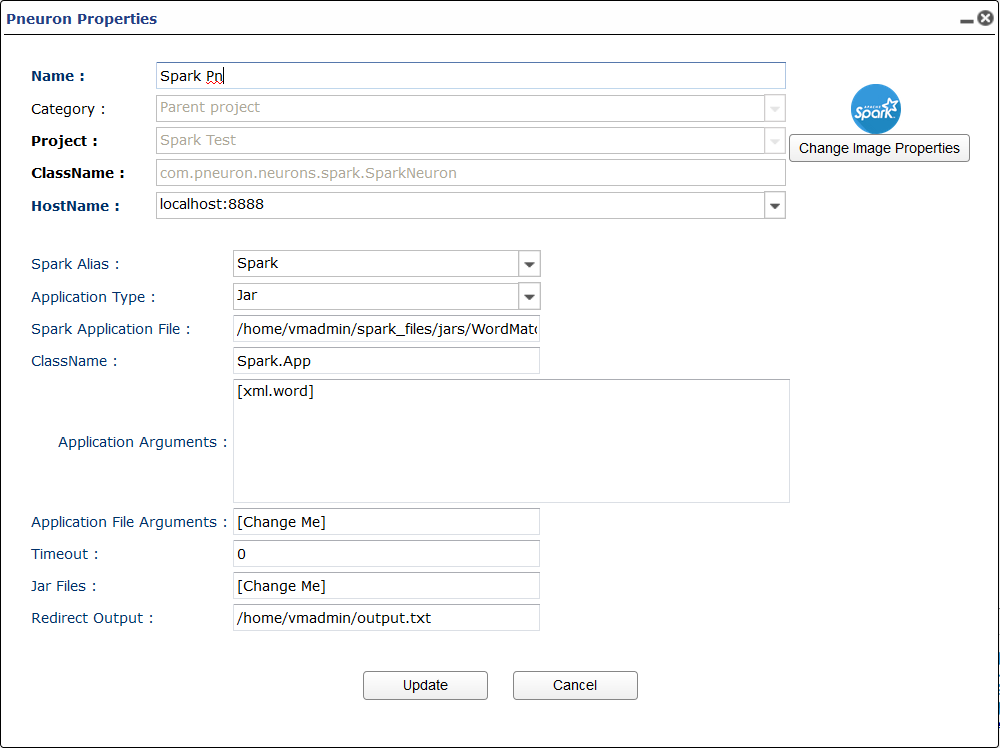
Spark Alias
Spark Alias used to connect and submit jobs to the Spark Cluster
Appication Type
The type of appliction you are submitting. Jar or PySpark
Spark Application File
Path to the file you want to execute.
Class Name
Class name when using Jar.
Application Arguments
Application arguments you want to enter into the application. These can be message tags.
Application File Arguments
File path to any file arguments that the application needs to run
Jar Files
Path to any Jar files needed to run the application.
Redirect Output
Path to a file where output is saved. If left blank output is shown on console.
Start Transaction Pneuron
| Image | Category | Description |
|---|---|---|
 |
Messaging | Flags network messages as transactions for tracking network start. Used with Check Transaction Pneuron to determine when a network has completed processing. |
Pneuron Configuration
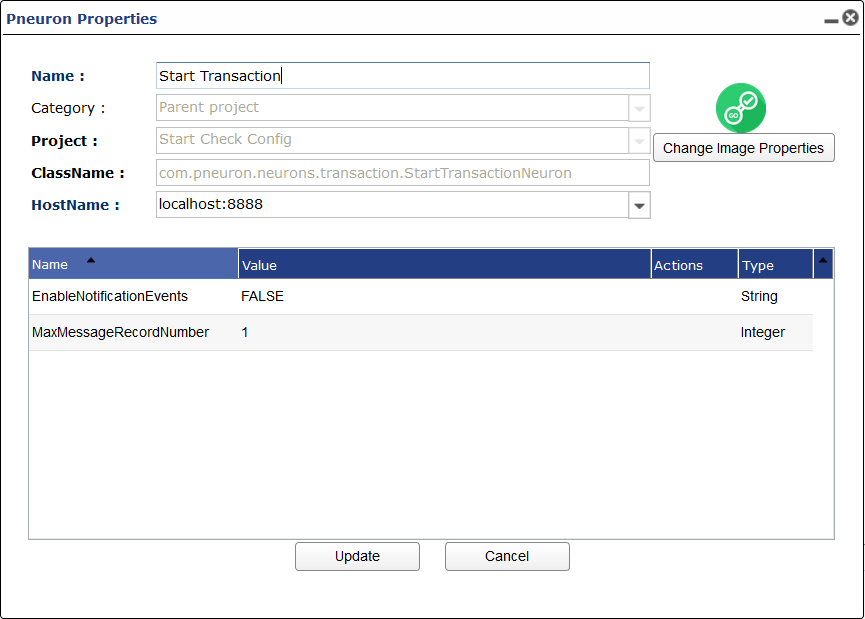
Enable Notification Events
Option for enabling notification events. TRUE or FALSE.
Max Message Record Number
Number of records per message sent from this Pneuron.
Stored Procedure Pneuron
| Image | Category | Description |
|---|---|---|
 |
Data Interaction | Calls a stored procedure within a defined data source. |
Pneuron Configuration
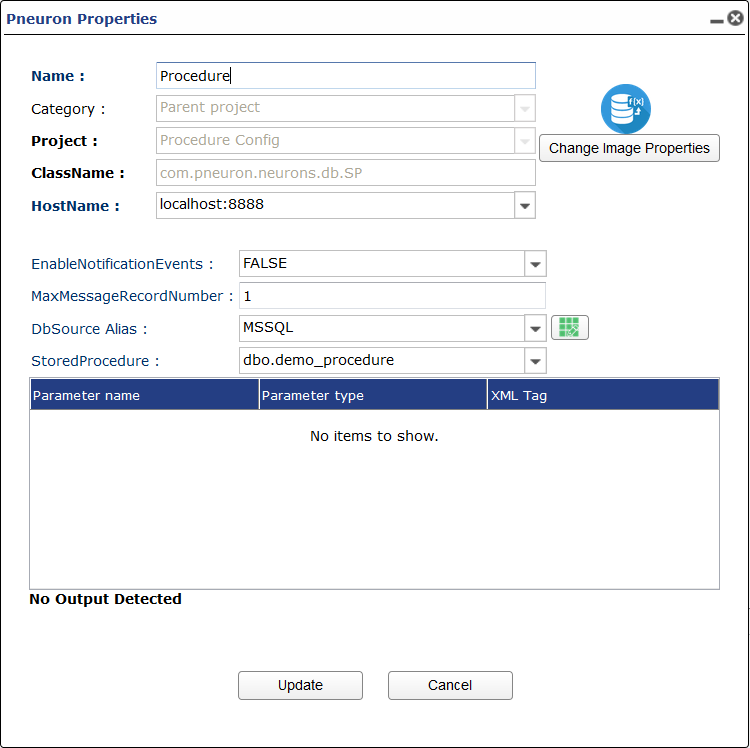
Enable Notification Events
Option for enabling notification events. TRUE or FALSE.
Max Message Record Number
Number of records per message sent from this Pneuron.
DB Source Alias
DB Source Alias where the stored procedure is.
Stored Procedure
Name of stored procedure.
Parameter Mapping
Map returned parameter to a XML tag.
Update Pneuron
| Image | Category | Description |
|---|---|---|
 |
Data Interaction | Executes a database insert, delete or update statement against a defined data source. |
Pneuron Configuration
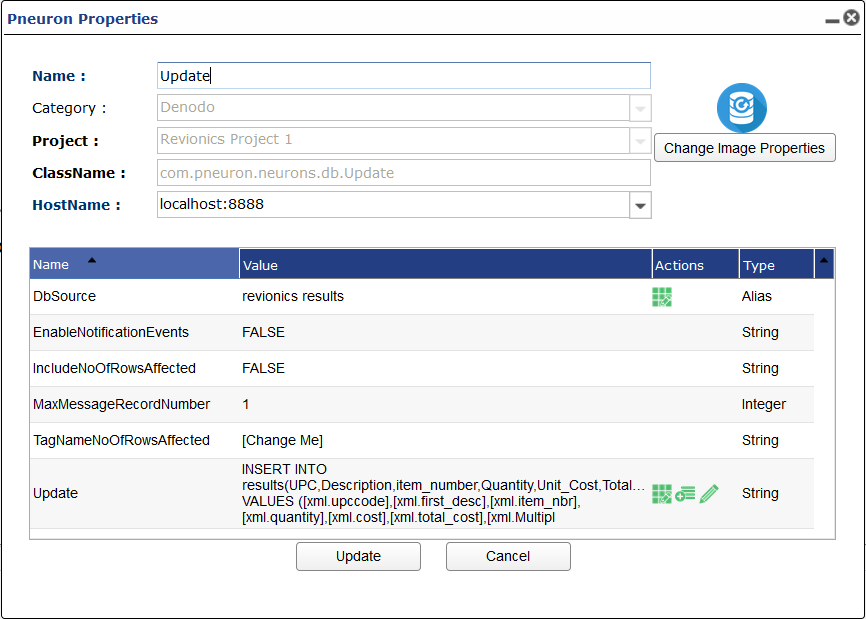
Db Source
DB Source Alias of table or database you want to perform an update/inset into/ or delete query.
Enable Notification Events
Option for enabling notification events. TRUE or FALSE.
Include No. of Rows Affected
Returns number of rows affected from the query as a message item.
Max Message Record Number
Number of records per message sent from this Pneuron.
Tag Name No. of Rows Affected
Tag name of number of rows affected from the query.
Update
Update SQL query.
Var Cache Pneuron
| Image | Category | Description |
|---|---|---|
 |
Data Interaction | Inserts pre-defined user variable values into an outgoing XML message. These values can be viewed and changed in the ECM. |
Pneuron Configuration
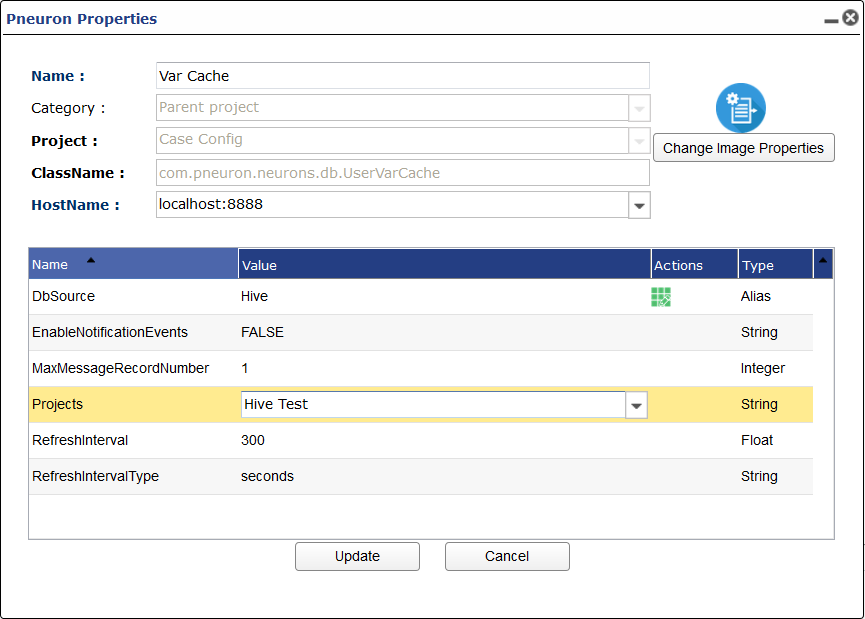
DB Source
DB Source alias where results are saved to.
Enable Notification Events
Option for enabling notification events. TRUE or FALSE.
Max Message Record Number
Number of records per message sent from this Pneuron.
Projects
Which projects will have the pre-defined variable inserted in the outgoing XML.
Refresh Interval
Interval till a refresh happens.
Refresh Interval Type
Unit of time that applies to the refresh interval.
Var Pneuron
| Image | Category | Description |
|---|---|---|
 |
Data Interaction | Creates a new element in a message by adding a field to the outgoing XML message. |
Pneuron Configuration
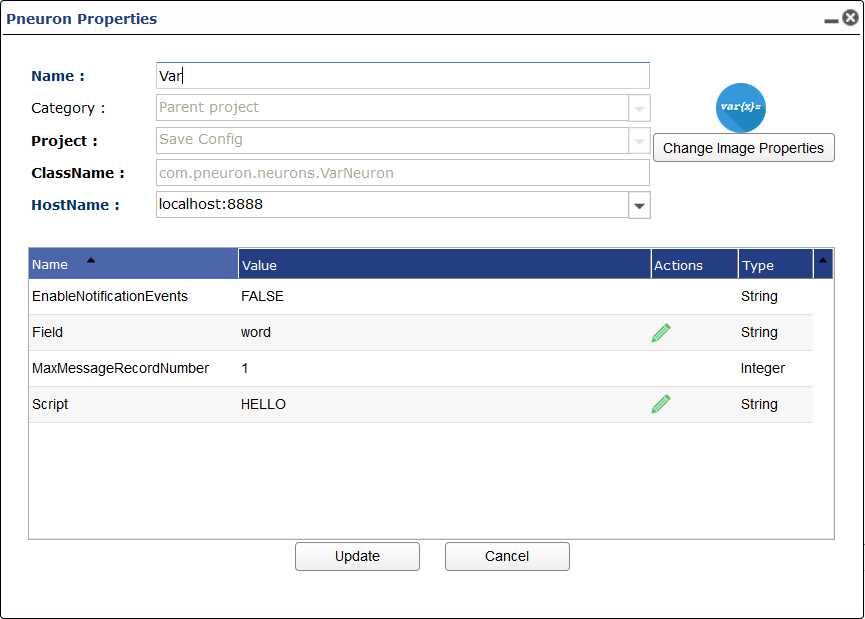
Enable Notification Events
Option for enabling notification events. TRUE or FALSE.
Field
Name of new message item
Max Message Record Number
Number of records per message sent from this Pneuron.
Script
What is contained in the new message item.
Wrapper Pneuron
| Image | Category | Description |
|---|---|---|
 |
All | Encapsulates existing third party or customer written Java libraries, classes and methods into a Pneuron for use within a network. |